Use a WDC in Tableau Desktop
Deprecated: This repository will be removed with the Tableau 26.3 release.
The Web Data Connector 2.x framework is deprecated. Migrate to the REST API Connector on Tableau Exchange — built by Tableau, supports JSON and CSV over HTTP GET, Basic/Bearer/OAuth authentication, and runs on Tableau 2023.3 and later. Note: this connector is extract-only and requires a JDBC driver installation.
To use a WDC in Tableau Desktop, complete the following steps:
-
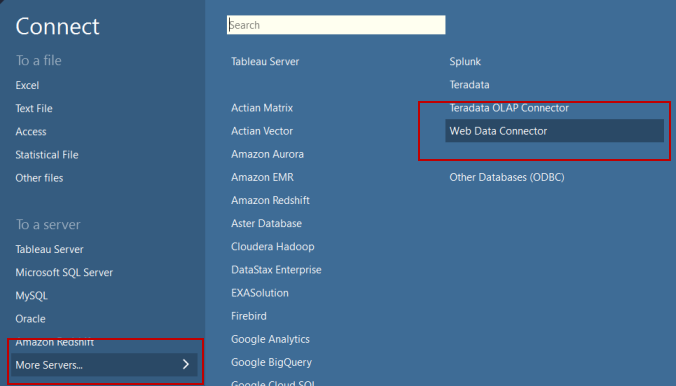
On the start page, in the Connect pane, click More Servers… > Web Data Connector.
-
Enter the URL of a WDC and press Enter.
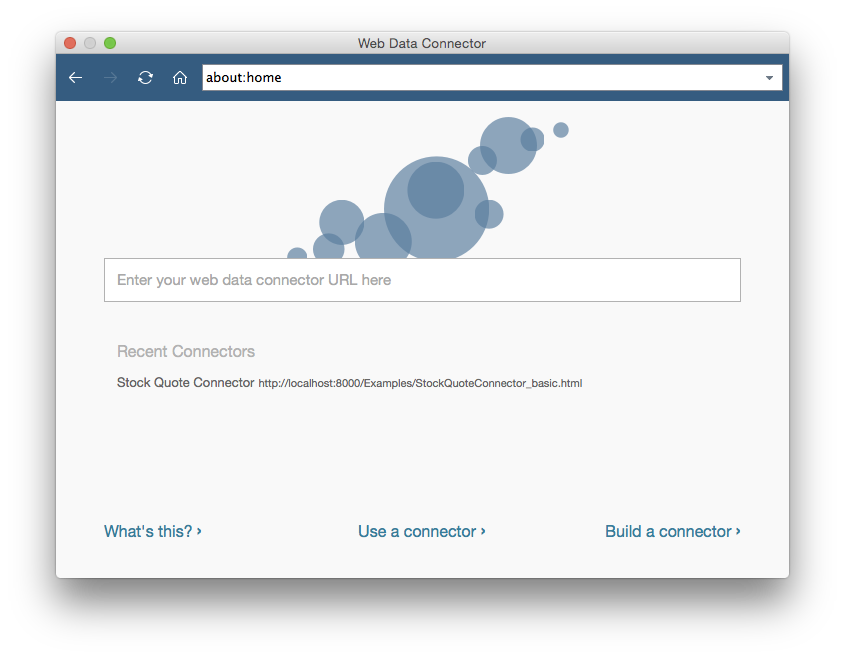
Important: Make sure that you enter the URL of a WDC, and not the URL of the data that you’re trying to connect to. For example, if you want to connect to FaceBook data, you might enter
www.example.com/myFacebookWDC.html. -
Tableau loads the WDC page where you can enter any input required by your WDC.
-
Tableau calls your WDC code, downloads data, and displays it in the Data Source pane.
For more information about using a WDC in Tableau Desktop, see Web Data Connector.